Make the creative ambition and the release conditions part of the same brief. Ask for evidence of the experience people will actually use.
01 / The brief: more depth, with a clearer offer
The existing charcoal, lavender, pale lilac and lime palette stayed. The work focused on what the website said and how people moved through it: an expressive opening, photography with a defined role, a way to explore five disciplines and service pages that explain what a project can include.
We kept the five established service URLs and expanded their content with concrete deliverables, example situations, acceptance criteria, scope boundaries and answers to buying questions. Three guides added more detailed explanations of briefing, immersive websites and AI workflows. The goal was to help someone understand the offer before making an inquiry.
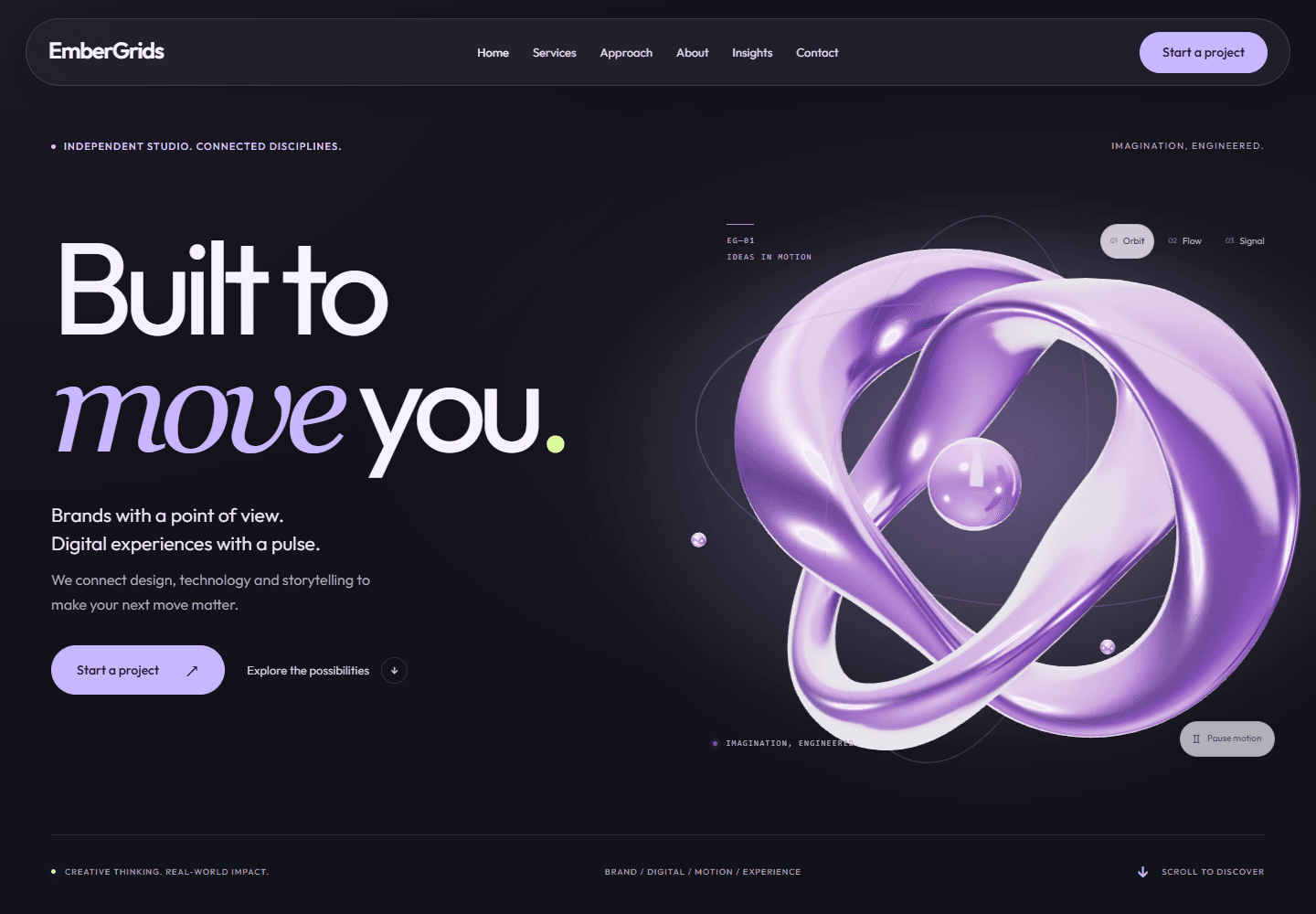
Licensed editorial photographs illustrate the five disciplines. The image at the top of this note is an actual capture of the EmberGrids homepage, showing how the visual identity, message and interactive object come together.
Explore the five service pages and their project deliverables
02 / One expressive object, with a separate reading layer
The opening uses a custom ribbon sculpture, with a reflective material, a central sphere and orbiting details. Three compositions, Orbit, Flow and Signal, alter its form. Pointer movement and scrolling influence the scene. The surrounding headline, description and project links remain ordinary page elements; the sculpture does not contain the essential offer.
The implementation uses Three.js WebGPURenderer. Its documented approach selects WebGPU when available and can fall back to WebGL2. We also provide a static visual composition if the live scene cannot run. The release record includes a WebGPU check in Chrome and fallback checks in a headless browser. Those are tested configurations, not a claim of identical rendering on every device.
We generate the sculpture geometry and its reflection environment in the application. This particular scene does not download a separate 3D model or HDR environment file. That choice gives the composition a controlled asset budget; it does not mean that every future project should avoid model assets.
Reference: Three.js: WebGPURenderer ↗
Explore Orbit, Flow and Signal on the live EmberGrids homepage
03 / Treat motion, pausing and failure as designed states
The scene responds to the device’s reduced-motion preference and includes a visible pause control when animation is available. Its animation loop pauses while the scene is outside the observed viewport area or the browser page is hidden. When a browser reports data saving or less than 4 GB of device memory, the loader keeps the static composition instead of enabling the 3D scene.
We tested the controls with coordinate-based clicks, then compared the paused scene across screenshots. That distinction mattered: a control can exist in the page and still sit under another element that receives the click. Responsive hero content and scene controls were adjusted after this review. The resulting release checks covered the project link and the sculpture controls, not just whether their labels were visible.
Reduced-motion behavior uses the browser preference documented by MDN. The practical requirement is that the visitor can still understand the page and use its links when movement is removed. A visual fallback is a planned state of the experience, rather than an explanation left on a loading screen.
Reference: MDN: prefers-reduced-motion ↗
Read the broader guide to immersive websites, performance and accessibility
04 / Verify the information that arrives with the page
The service descriptions and guide bodies are rendered into the HTML response. Each page has its own title and canonical URL. Guide pages include Article and Breadcrumb structured data; service pages include Service and Breadcrumb data. Ordinary links connect the homepage, service pages and relevant reading.
On 9 September 2026, a live HTTP review of the five service pages and three original guide pages found successful responses, one H1 and one correct canonical per page, plus the expected content and structured data. The sitemap included those pages, and robots.txt allowed their public routes. A separate browser check confirmed that guide text remained readable with JavaScript disabled.
These checks establish what the site serves and how its pages are connected. Google’s documentation describes crawling, rendering and indexing as separate steps. A successful response, sitemap entry or structured-data check does not establish that Google has indexed a page, selected its canonical or awarded it a particular search position.
05 / A reusable release evidence checklist
Use this framework when commissioning a website with animation, 3D or other interactive features. For each requirement, agree who checks it and retain a dated observation from the release being reviewed. “Present,” “works in this test” and “observed with real visitors” describe different kinds of evidence.
The checks below can become part of a project’s acceptance criteria. Replace the example journeys and device range with the ones that matter to your audience. Leave an unresolved item visible and assign an owner, rather than converting a successful automated score into a blanket statement of readiness.
| Requirement | Practical check | Record to keep |
|---|---|---|
| The offer is understandable | Read the key pages without the visual scene. Find the intended audience, deliverables and next step. | Approved page content and the URLs reviewed. |
| The primary action is usable | Click or tap the actual target on agreed desktop and mobile sizes; repeat with a keyboard. | Target, viewport, input method and observed outcome. |
| Motion can be reduced | Use the device preference and the site’s pause control; confirm that links and content still work. | Reduced-motion and paused-state observations from the release. |
| Failure has a usable fallback | Test with the scene unavailable and with JavaScript disabled. Review reading and navigation separately. | What remains available, what changes and any limitations. |
| Pages can be discovered | Inspect responses, canonical URLs, robots rules, sitemap entries and ordinary internal links. | Dated HTTP checks; search-engine indexing status recorded separately. |
| Performance claims have context | Record test device, network assumptions, tool and release. Compare real visitor data when available. | The report and conditions, labeled as lab or field evidence. |
06 / What this release does and does not establish
The release work combined code checks, responsive browser checks, automated accessibility review, visual inspection, fallback testing and live page-response checks. The recorded responsive widths were 1440, 1024, 768, 430, 375 and 320 pixels. These checks describe the tested release and conditions; they are not accessibility certification or coverage of every device.
Lighthouse was used on a local production preview during the redesign. We treat those reports as diagnostic lab evidence. We are not presenting them as current live-site scores, field Core Web Vitals or a measure of search authority. The useful next questions concern actual visitors: what they can find, where they encounter difficulty and whether the site helps them make an informed next step.
This note is published by EmberGrids about its own implementation. The buyer guides explain the reasoning in more general terms; this build note supplies a concrete example and a reusable way to ask for evidence. If you find a factual error, use the correction contact in our editorial notes and include the page and claim concerned.
Reference: Chrome for Developers: Introduction to Lighthouse ↗
About this build note
EmberGrids publishes practical guidance on brand design, digital products, applied AI and immersive experiences.
Prepared with AI assistance using the website implementation, documented release checks and live page responses from 9 September 2026. The screenshot and observations document our own website on that date.
Sources and further reading
Put the thinking to work
Bring us the question
behind your project.
We can help turn an ambition into a clear brief, a useful prototype and an agreed plan for delivery.
Discuss a project ↗